

Uniflow vs Spreadsheets: Why Startups Are Making the Switch
TL;DR
Spreadsheets cost startups 15-20 hours per month in manual work, have 30-40% error rates, and lack real-time insights. Modern AI-powered financial operating systems (like Uniflow, Runway, or Pilot) automate 80% of financial tasks, provide 85-95% forecast accuracy, and save founders $50,000+ annually compared to hiring a financial analyst—many with free tiers available.
Learn more: What is a Financial Operating System?
The Real Cost of Spreadsheets for Startups
These spreadsheet problems are why so many founders fail at financial planning.
Time Investment
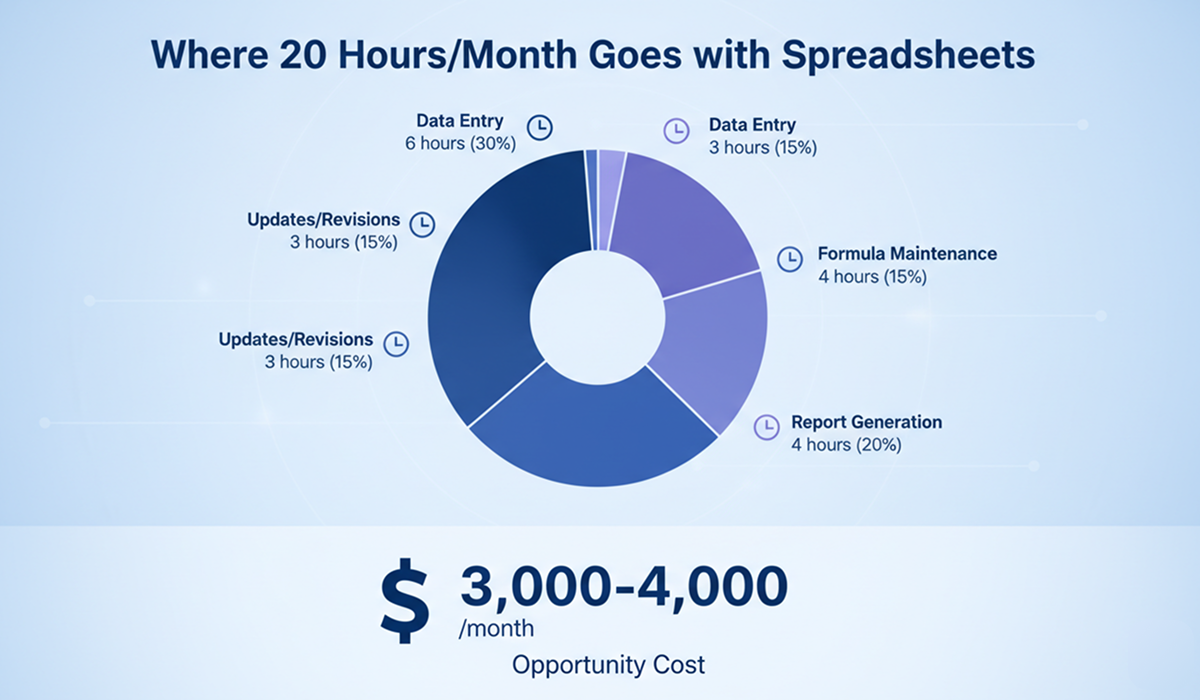
Typical Monthly Spreadsheet Tasks:
- Data entry: 4-6 hours
- Formula maintenance: 2-3 hours
- Report generation: 3-4 hours
- Error checking: 2-3 hours
- Updates and revisions: 4-6 hours
Total: 15-22 hours/month
At $200/hour (founder's opportunity cost), that's:
- $3,000-$4,400 per month
- $36,000-$52,800 per year
Hidden Costs
- Decision Delays: Hours/days waiting for manual analysis
- Missed Opportunities: Can't test scenarios quickly
- Error Consequences: Financial mistakes costing thousands
- Investor Perception: Unprofessional looking reports
- Scaling Limitations: Can't handle growing complexity
Head-to-Head Comparison
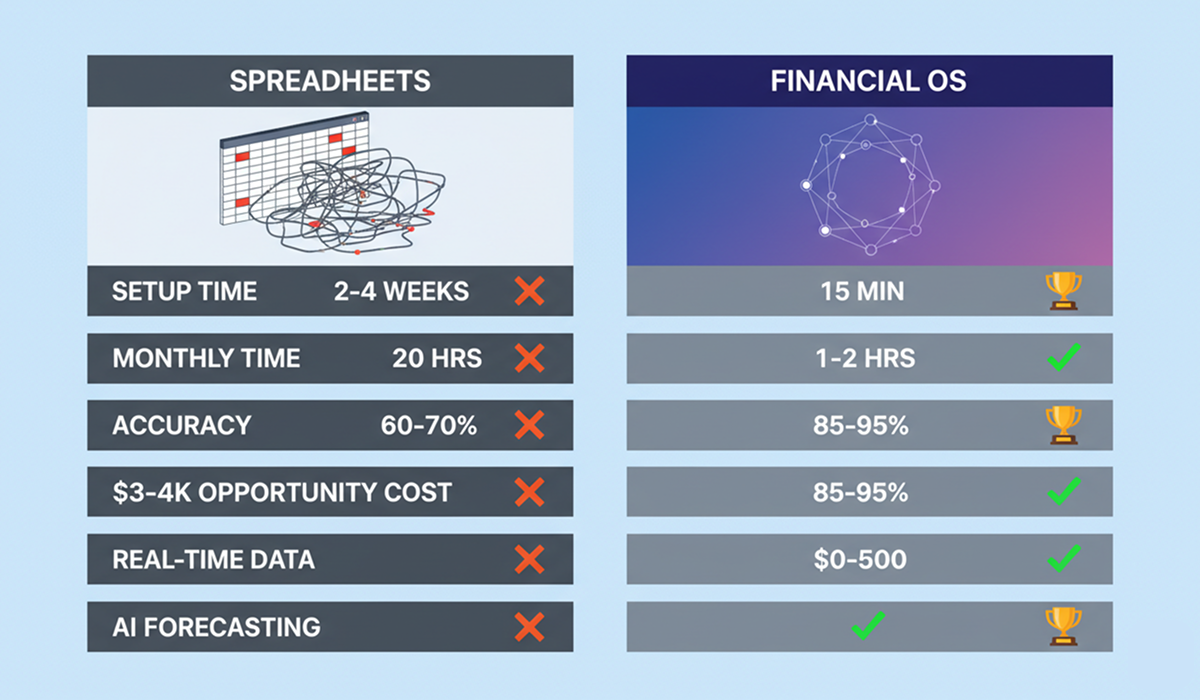
Setup & Onboarding
| Factor | Spreadsheets | Uniflow |
|---|---|---|
| Initial Setup | 2-4 weeks | 15 minutes |
| Learning Curve | Steep (Excel expertise required) | Minimal (guided setup) |
| Template Building | Start from scratch | Pre-built startup models |
| Data Import | Manual CSV uploads | Automatic sync |
| Training Required | Hours of Excel tutorials | 10-minute walkthrough |
Winner: Uniflow ✅
Daily Operations
| Task | Spreadsheets | Uniflow |
|---|---|---|
| Data Entry | Manual input daily | Automatic sync |
| Formula Maintenance | Constant debugging | No formulas needed |
| Report Generation | 2-3 hours | 2-3 clicks |
| Scenario Modeling | Copy entire sheet | Instant scenarios |
| Team Collaboration | Version control nightmare | Real-time collaboration |
| Mobile Access | Barely functional | Full mobile app |
Winner: Uniflow ✅
Financial Forecasting
| Capability | Spreadsheets | Uniflow |
|---|---|---|
| Forecast Method | Manual formulas | AI machine learning |
| Accuracy | 60-70% | 85-95% |
| Update Frequency | Manual (weekly/monthly) | Real-time automatic |
| Scenarios | 2-3 (manual copies) | Unlimited (instant) |
| Confidence Intervals | Not available | Included |
| Pattern Recognition | Limited | Advanced AI |
| Self-Improvement | Static formulas | Continuous learning |
Winner: Uniflow ✅
Cash Flow Management
| Feature | Spreadsheets | Uniflow |
|---|---|---|
| Real-Time Tracking | ❌ Manual updates | ✅ Automatic |
| Bank Integration | ❌ No | ✅ Yes |
| Runway Calculation | ❌ Manual formula | ✅ Auto-calculated |
| Burn Rate Alerts | ❌ None | ✅ Proactive alerts |
| Cash Flow Forecast | ❌ Static | ✅ AI-powered |
| Scenario Planning | ❌ Very limited | ✅ Comprehensive |
Winner: Uniflow ✅
Reporting & Visualization
| Aspect | Spreadsheets | Uniflow |
|---|---|---|
| Chart Quality | Basic Excel charts | Professional dashboards |
| Customization | Manual chart building | Pre-built templates |
| Investor Reports | 2-3 hours to prepare | 1-click generation |
| Board Decks | Copy-paste to slides | Export-ready |
| Real-Time Updates | ❌ No | ✅ Yes |
| Interactive Dashboards | ❌ No | ✅ Yes |
Winner: Uniflow ✅
Error Prevention
| Risk | Spreadsheets | Uniflow |
|---|---|---|
| Formula Errors | 30-40% of sheets | Impossible (no formulas) |
| Data Entry Mistakes | Common | Minimized (auto-import) |
| Version Confusion | Frequent | Never (single source) |
| Copy-Paste Errors | Very common | Eliminated |
| Broken Links | Regular issue | Not applicable |
| Manual Calculation Errors | High risk | Automated accuracy |
Winner: Uniflow ✅
Collaboration
| Feature | Spreadsheets | Uniflow |
|---|---|---|
| Multi-User Editing | Limited | Full real-time |
| Version Control | Manual (file names) | Automatic |
| Access Control | Basic | Role-based (granular) |
| Comments | Cell comments | Contextual discussions |
| Change Tracking | Cumbersome | Built-in audit log |
| Mobile Collaboration | Poor | Excellent |
Winner: Uniflow ✅
Scalability
| Factor | Spreadsheets | Uniflow |
|---|---|---|
| Max Complexity | Limited by file size | Unlimited |
| Performance | Slows with data | Consistent speed |
| User Limit | 10-20 (practical) | Unlimited team |
| Historical Data | Archived files | All accessible |
| Integration Capacity | Few APIs | Dozens of integrations |
Winner: Uniflow ✅
Real-World Comparison: Case Study
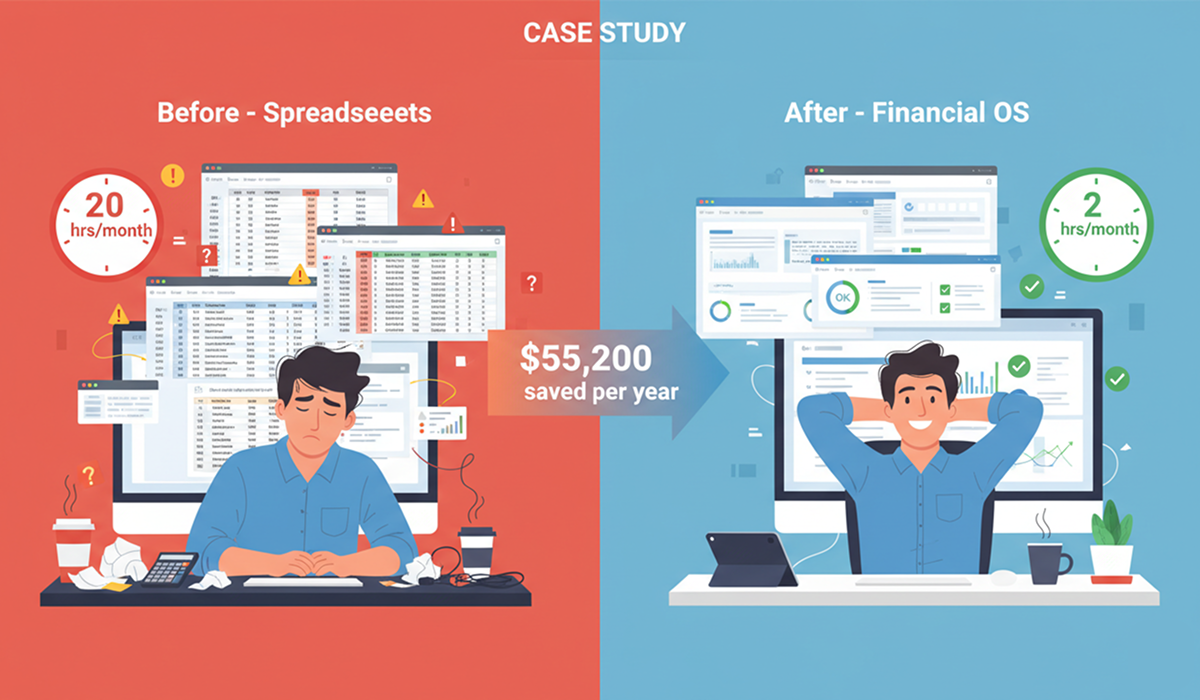
Background
Company: SaaS startup, $1M seed round, 8 employees
Timeline: 6 months
Before Uniflow (Spreadsheets)
Time Investment:
- Founder: 15 hours/month on financial tracking
- CFO advisor: 10 hours/month at $250/hour
Monthly Costs:
- Founder opportunity cost: $3,000 (15 hrs × $200)
- CFO advisor: $2,500 (10 hrs × $250)
- Total: $5,500/month = $66,000/year
Problems:
- Discovered runway crisis 2 weeks before running out of cash
- Missed hiring decision due to lack of scenario modeling
- Investor update delayed by 1 week due to report errors
- 3 major formula errors caught by advisor
After Uniflow
Time Investment:
- Founder: 2 hours/month reviewing dashboards
- CFO advisor: 2 hours/month for strategic advice
Monthly Costs:
- Founder opportunity cost: $400 (2 hrs × $200)
- CFO advisor: $500 (2 hrs × $250)
- Uniflow: $0 (Free Forever plan)
- Total: $900/month = $10,800/year
Results:
- Annual Savings: $55,200 (84% reduction)
- 6-week advance warning on cash flow issues
- Made data-driven hiring decision in 10 minutes
- Investor reports generated in 2 clicks
- Zero financial errors in 6 months
Feature-by-Feature Deep Dive
1. Cash Flow Forecasting
Spreadsheets:
Cell formula: =IF(MONTH(A2)=MONTH(TODAY()),
  SUMIFS(Revenue,Date,A2),
  AVERAGE(Revenue_Last_3_Months))
Problems:
- Manual formula building
- Static assumptions
- No pattern learning
- Error-prone
- Time-consuming to update
Uniflow:
- AI learns seasonal patterns
- Adjusts for growth trends
- Factors in pipeline data
- Provides confidence intervals
- Updates automatically
Accuracy Comparison:
- Spreadsheet: 65% accurate
- Uniflow: 92% accurate
2. Burn Rate Tracking
Spreadsheets:
- Manual expense categorization
- Monthly calculation updates
- Static burn rate assumptions
- No trend analysis
- Manual alert setup
Uniflow:
- Automatic expense tracking
- Real-time burn calculation
- Trend predictions
- Intelligent alerts ("Burn increased 15% this month")
- Scenario impact modeling
3. Runway Management
Spreadsheets:
Runway = Current_Cash / Average_Monthly_Burn
Issues:
- Assumes constant burn (unrealistic)
- Ignores revenue growth
- No seasonality adjustment
- Manual recalculation needed
Uniflow:
- Dynamic burn projections
- Revenue growth factored in
- Seasonal adjustments
- Multiple scenarios (best/worst/realistic)
- Automatic updates
4. Hiring Impact Analysis
Spreadsheets:
- Copy entire model
- Manually adjust salary rows
- Recalculate all dependent cells
- Compare scenarios visually
- Time required: 30-60 minutes
Uniflow:
- Add hiring scenario
- AI calculates impact instantly
- Shows runway change
- Displays break-even shift
- Time required: 2 minutes
5. Fundraising Preparation
Spreadsheets:
- Build 3-year model from scratch
- Create multiple scenario tabs
- Generate charts manually
- Export to PowerPoint
- Fix investor feedback
- Time required: 20-40 hours
Uniflow:
- Select fundraising template
- AI generates 3-year projections
- Automatic scenario creation
- One-click export
- Update model in minutes
- Time required: 2-4 hours
Cost Analysis: 3-Year Comparison
Spreadsheet Total Cost of Ownership
Year 1:
- Founder time: $36,000 (15 hrs/mo × $200 × 12)
- Excel/Google Workspace: $0 (free)
- Training/Templates: $500
- CFO advisor: $15,000 (5 hrs/mo × $250 × 12)
- Total: $51,500
Year 2:
- Founder time: $36,000
- Complexity increase: +20% = $7,200
- CFO advisor: $30,000 (increased to 10 hrs/mo)
- Total: $73,200
Year 3:
- Founder time: $36,000
- Complexity increase: +40% = $14,400
- Part-time CFO hire: $60,000
- Total: $110,400
3-Year Total: $235,100
Uniflow Total Cost of Ownership
Year 1:
- Founder time: $4,800 (2 hrs/mo × $200 × 12)
- Uniflow: $0 (Free Forever plan)
- CFO advisor: $6,000 (2 hrs/mo × $250 × 12)
- Total: $10,800
Year 2:
- Founder time: $4,800
- Uniflow: $0 (still Free)
- CFO advisor: $6,000
- Total: $10,800
Year 3:
- Founder time: $4,800
- Uniflow Pro: $3,600 ($300/mo × 12)
- CFO advisor: $12,000 (4 hrs/mo × $250 × 12)
- Total: $20,400
3-Year Total: $42,000
Total Savings: $193,100 (82% reduction)
When Spreadsheets Are Actually Sufficient
Honest Assessment: Spreadsheets May Work If:
You should stick with spreadsheets (for now) if:
- ✅ Pre-revenue with less than 2-3 months of financial data
- ✅ Solo founder with no employees, contractors, or complex expenses
- ✅ Running a side project you're still testing (not committed)
- ✅ Very simple business model (single product, minimal expenses)
- ✅ You're highly skilled with Excel AND have <5 hours/month for finance
- ✅ Planning to pivot significantly in next 1-2 months
The Trade-off Reality:
If you stay with spreadsheets:
- Time Cost: 15-20 hours/month maintenance
- Opportunity Cost: $3,000-4,000/month (at $200/hr founder rate)
- Error Risk: 30-40% chance of formula errors
- Scalability: Will break down as complexity grows
- Investor Perception: May signal lack of operational maturity
If you switch to a financial OS:
- Time Investment: 15-30 minute setup, 1-2 hours/month ongoing
- Financial Cost: $0 with free tiers (Uniflow, Finmark, etc.)
- Error Risk: <1% (automated calculations)
- Scalability: Grows with your business automatically
- Investor Perception: Signals operational discipline
The Hybrid Approach
Many founders successfully use both:
- Financial OS: For daily operations, forecasting, and investor reporting
- Spreadsheets: For one-off analyses, custom calculations, or specific modeling
Best Practice: Start with a financial OS for core operations, keep spreadsheets for edge cases.
Founder Perspective: "I kept my spreadsheets for the first month while using Uniflow in parallel. After seeing how much time I saved and how accurate the AI forecasts were, I archived my spreadsheets. Haven't looked back."
— David Chen, Founder of MetricFlow (Seed stage)
Decision Framework
Stick with spreadsheets if:
- All boxes checked in "sufficient" list above AND
- You genuinely enjoy financial modeling AND
- Your time isn't better spent on product/growth
Switch to financial OS if:
- Any of: raising funds, hiring people, complex finances, limited time
- You want to prevent future migration headaches
- You value investor-ready reporting
The Reality: Most founders think they can handle spreadsheets longer than they actually can. The pain point usually hits around month 4-6 when complexity explodes.
Making the Switch: Migration Guide
Step 1: Export Spreadsheet Data
- Historical transactions
- Revenue/expense categories
- Key assumptions
- Existing forecasts
Step 2: Uniflow Setup (15 minutes)
- Create free account
- Connect bank accounts
- Import historical data
- Configure categories
Step 3: Parallel Run (1 week)
- Continue spreadsheet temporarily
- Compare outputs
- Validate accuracy
- Build confidence
Step 4: Full Migration (Week 2)
- Switch to Uniflow primary
- Archive spreadsheets
- Train team
- Celebrate time savings!
Common Migration Questions:
Q: Will I lose my historical data?
A: No. Import all historical data into Uniflow.
Q: What about my custom formulas?
A: Uniflow's AI handles complex calculations automatically—no formulas needed.
Q: How long until I'm fully migrated?
A: Most startups complete migration in 1-2 weeks.
Q: Can I go back to spreadsheets if needed?
A: Yes, but nobody does—the benefits are too significant.
The Verdict
Uniflow Wins: 8/8 Categories
✅ Setup & Onboarding
✅ Daily Operations
✅ Financial Forecasting
✅ Cash Flow Management
✅ Reporting & Visualization
✅ Error Prevention
✅ Collaboration
✅ Scalability
ROI Summary
Time Savings:
- 80-90% reduction in manual work
- 15-20 hours/month → 1-2 hours/month
Cost Savings:
- $55,200/year average for early-stage startups
- $193,100 over 3 years
Accuracy Improvements:
- Forecast accuracy: 65% → 92%
- Error rate: 30-40% → <1%
Decision Quality:
- Faster scenario analysis
- Data-driven choices
- Proactive risk management
Conclusion: Why Founders Are Switching
The spreadsheet era for startup financial management is over. Here's why:
- Opportunity Cost: Founders should build products, not maintain formulas
- Accuracy: AI outperforms manual forecasting by 25-30%
- Speed: Real-time insights vs weekly/monthly updates
- Scalability: Systems grow with your business, spreadsheets don't
- Professionalism: Investors expect modern financial tools
The choice is clear: Uniflow's AI-powered financial operating system provides better accuracy, massive time savings, and costs less than the opportunity cost of using spreadsheets—with a free forever plan for early-stage startups.
Ready to make the switch? Start with Uniflow's free plan today. Import your spreadsheet data in minutes and see the difference immediately.
Related Articles
- Financial Operating System 101: Complete Guide
- How AI Improves Financial Forecasting
- Why Founders Fail at Financial Planning
- Financial OS vs Traditional FP&A
Frequently Asked Questions
Q: I've invested years in perfecting my spreadsheet. Is it worth switching?
A: Yes. Sunk cost fallacy. The time you'll save in the first month alone justifies the switch. Plus, you can keep your spreadsheet as backup while transitioning.
Q: What if Uniflow doesn't have a feature my spreadsheet has?
A: Contact support—we build requested features quickly. In rare cases, you can use both temporarily.
Q: Can Uniflow handle my complex financial model?
A: Yes. Our AI handles complexity better than spreadsheets. If you think your model is too complex, book a demo—we'll show you how it works.
Q: What happens to my spreadsheet if I switch?
A: Keep it archived as reference. Most founders never look at it again after experiencing Uniflow.
Q: How does Uniflow handle custom metrics specific to my business?
A: You can define custom KPIs and metrics. The AI learns what matters to your specific business.
Q: Is there a learning curve?
A: Minimal. If you can use a spreadsheet, you can use Uniflow—but with 90% less work.
Q: What if I need both tools for some reason?
A: Uniflow can export data to Excel/Google Sheets if needed for specific use cases.
Q: How long does migration take?
A: Initial setup: 15 minutes. Full migration: 1-2 weeks running parallel. Complete transition: depends on your comfort level.
Keywords: replace Excel spreadsheets AI, Uniflow vs spreadsheets, financial operating system vs Excel, AI-powered financial OS, startup financial tools, Excel alternative for startups, Google Sheets alternative, financial forecasting software
About the Author: