

Financial Operating System 101: The Complete Guide for Startups
TL;DR
A financial operating system (Financial OS) is an integrated platform that manages all your startup's financial operations—from cash flow forecasting to burn rate tracking. Modern financial OS platforms use AI to automate forecasting, provide real-time insights, and help founders make data-driven decisions. This guide covers what they are, when you need one, and how to choose the right solution for your stage.
What is a Financial Operating System?
A financial operating system is a comprehensive software platform that centralizes and automates a company's financial management processes. Think of it as the command center for your startup's financial health—bringing together forecasting, cash management, reporting, and analytics in one place.
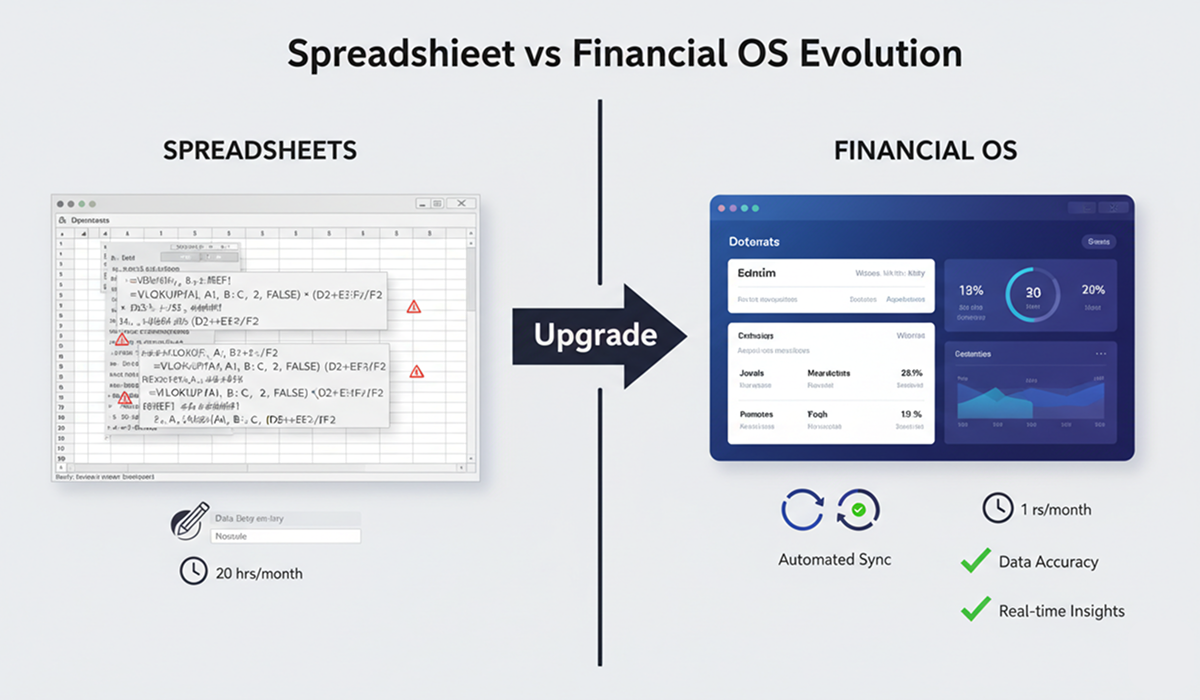
The Evolution of Startup Finance
2010s Approach: Excel spreadsheets + manual updates + monthly reviews
2020s Approach: AI-powered financial OS + real-time data + proactive alerts
The shift reflects how startups operate today: faster, more data-driven, and requiring instant visibility into financial health.
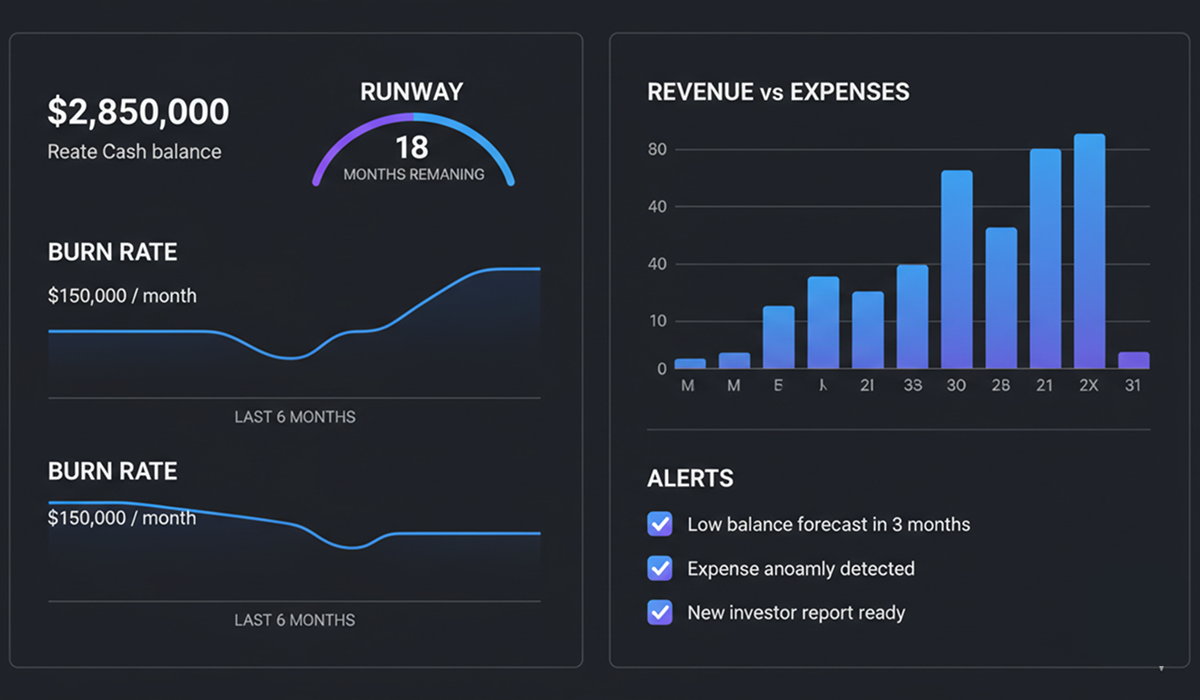
Key Components of a Financial OS
Modern financial operating systems typically include:
- Cash Flow Management: Real-time tracking of money in and out
- Financial Forecasting: AI-powered predictions of future financial performance
- Burn Rate Calculator: Automatic calculation of monthly cash consumption
- Runway Tracking: Visibility into how long your capital will last
- Financial Modeling: Scenario planning and what-if analysis
- Reporting & Analytics: Investor-ready financial reports
Expert Insight: "The biggest shift I've seen is from reactive to proactive financial management. With a financial OS, founders know about problems weeks before they become crises."
— Marcus Rodriguez, Fractional CFO, worked with 40+ startups
Why Startups Need a Financial Operating System
The Core Problem: Spreadsheet Limitations
Most early-stage founders start with Excel or Google Sheets. While spreadsheets work for very basic tracking, they break down as complexity grows:
- Manual Updates: Hours spent updating formulas and data each week
- Error-Prone: One wrong formula can cascade into major mistakes (studies show 30-40% of spreadsheets contain errors)
- No Real-Time Insights: Data is always outdated by the time you review it
- Difficult to Scale: Complexity grows exponentially with business growth
- Not Investor-Ready: Lacks professional presentation standards
The Financial OS Advantage
Modern financial operating systems address these limitations:
✅ Automates data entry and calculations
✅ Predicts cash flow with AI algorithms
✅ Alerts you to financial risks before they become critical
✅ Scales effortlessly as your business grows
✅ Impresses investors with professional reports
For a detailed comparison of spreadsheets vs modern tools, read: Uniflow vs Spreadsheets: Why Startups Are Making the Switch
When Do You Actually Need a Financial OS?
⚠️ Honest Assessment: When Spreadsheets Are Still Sufficient
Let's be clear about when you DON'T need a full financial operating system yet:
Spreadsheets may still work if you're:
- Pre-revenue with less than 3 months of financial data
- Solo founder with no employees or contractors
- Running a side project or testing an idea (not yet committed)
- Planning to significantly pivot in the next 1-2 months
- Comfortable with finance and have <5 hours/month for financial tasks
However, even in these cases, consider:
- Most financial OS platforms have free tiers (zero cost to start)
- Setup takes 15-30 minutes (minimal time investment)
- Early adoption prevents bad habits from forming
- You'll need it soon anyway as complexity grows
Real Founder Experience: "I waited until month 8 to switch from spreadsheets. Looking back, those early months of messy data and bad habits cost me 20+ hours to clean up later. Start right from day one."
— Jessica Park, Founder of DataFlow (raised $2M seed)
✅ Clear Signs You NEED a Financial OS Now
You definitely need a financial operating system if:
⚠️ Spending >5 hours/week on financial spreadsheets
⚠️ Unable to instantly answer "How much runway do we have?"
⚠️ Making decisions without financial data to back them up
⚠️ Missed financial deadlines or found reporting errors
⚠️ Investors asking questions you can't quickly answer
⚠️ Planning to hire employees in next 3 months
⚠️ Preparing for fundraising
⚠️ Managing multiple revenue streams or complex pricing
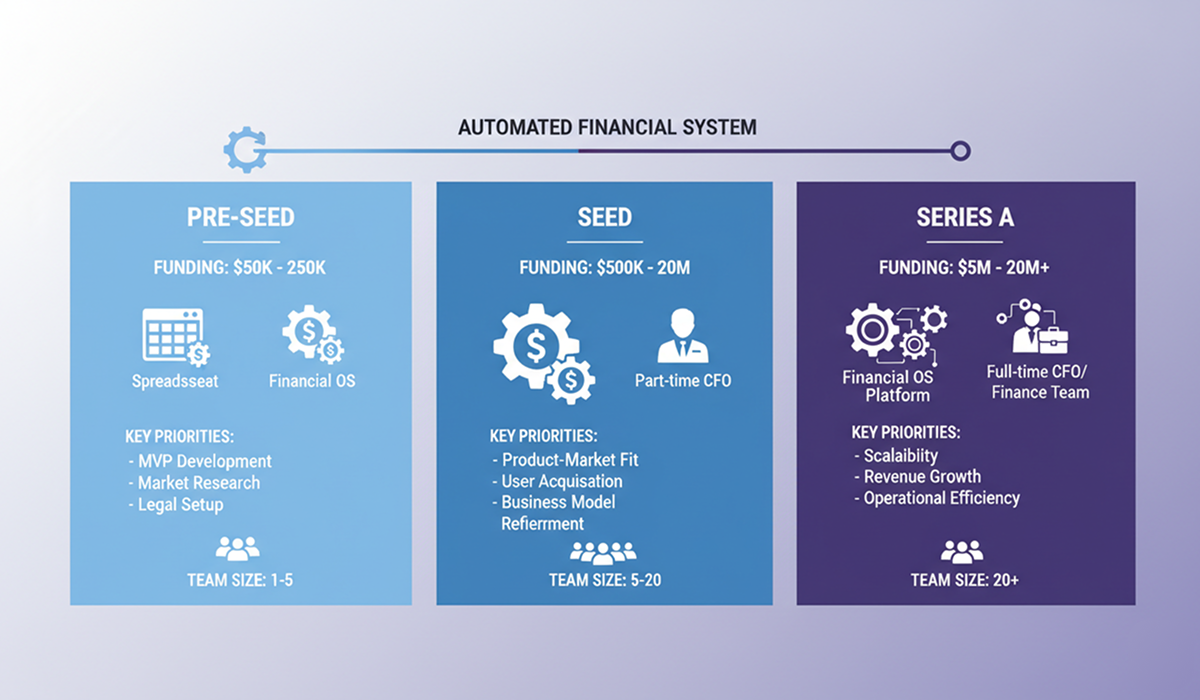
By Startup Stage
Pre-Seed (Idea to $500k raised)
- Minimum: Basic cash tracking and runway calculator
- Ideal: Simple financial OS with forecasting
- Priority: Understanding burn rate and runway
Seed ($500k - $2M raised)
- Minimum: Financial OS with scenario modeling
- Ideal: Full financial OS + fractional CFO advisor
- Priority: Growth planning and investor reporting
Series A ($2M - $10M raised)
- Minimum: Comprehensive financial OS + financial advisor
- Ideal: Financial OS + part-time or full-time CFO
- Priority: Scaling operations and advanced planning
How Financial Operating Systems Compare to Alternatives
Option 1: Spreadsheets (DIY Approach)
Best For: Very early stage, simple models, financially savvy founders
Pros:
- Free (if you don't count your time)
- Complete customization
- No learning curve if you know Excel
Cons:
- Time-intensive (15-20 hours/month)
- Error-prone (30-40% of sheets have errors)
- Doesn't scale with complexity
- No AI insights or automation
Real Cost: At $200/hour founder opportunity cost = $3,000-4,000/month
Option 2: Bookkeeper ($500-1,500/month)
Best For: Startups needing accurate historical records
Pros:
- Professional transaction categorization
- Tax preparation support
- Clean financial records
Cons:
- Backward-looking only (no forecasting)
- Doesn't help with strategic decisions
- Limited availability and turnaround time
When to Use: Combine with financial OS for best results
Option 3: Fractional CFO ($2,000-5,000/month)
Best For: Complex financial situations, pre-Series A fundraising
Pros:
- Expert strategic guidance
- Fundraising experience
- Network connections
Cons:
- Expensive for early-stage
- Limited hours (typically 10-20/month)
- Reactive, not proactive daily monitoring
When to Use: After raising $1M+, ideally paired with financial OS for execution
Option 4: Financial Operating System ($0-500/month)
Best For: Most startups from pre-seed through Series A
Pros:
- Automated daily operations
- AI-powered forecasting
- Real-time insights and alerts
- Scalable as you grow
- Professional investor reporting
- 24/7 availability
Cons:
- Learning curve (minimal, but exists)
- Requires initial setup time
- Not a replacement for strategic CFO advice at later stages
When to Use: From day one, upgrade to paid tier as you scale
Popular Options:
- Uniflow: AI-powered, free for early-stage, focused on simplicity
- Runway: Focused on venture-backed startups, visual forecasting
- Pilot: Full-service including bookkeeping
- Finmark: Scenario planning focused
Recommended Approach by Stage
| Stage | Best Combination | Monthly Cost |
|---|---|---|
| Pre-Seed | Financial OS (free tier) | $0 |
| Seed | Financial OS + occasional CFO advice | $50-500 |
| Series A | Financial OS + Fractional CFO | $2,000-3,500 |
| Series B+ | Financial OS + Full-time CFO | $10,000+ |
Key Features to Look For in a Financial OS
Must-Have Features
-
Automatic Data Sync
- Connects to bank accounts, credit cards, payment processors
- Real-time transaction updates
- No manual data entry required
-
AI-Powered Forecasting
- Machine learning algorithms for predictions
- Confidence intervals and scenario planning
- Learns from your specific business patterns
Learn more about how AI forecasting works: How AI Improves Financial Forecasting for Startups
-
Cash Flow Visibility
- Current cash position
- Upcoming expenses and revenue
- Payment schedules and timing
-
Burn Rate & Runway Tracking
- Automatic calculation of monthly burn
- Runway projections under various scenarios
- Alerts when runway drops below thresholds
-
Scenario Modeling
- Best case / Worst case / Realistic modeling
- Impact analysis of hiring, pricing changes, etc.
- Quick what-if comparisons
-
Professional Reporting
- One-click investor report generation
- Board deck financial slides
- Custom dashboards for team visibility
Nice-to-Have Features
- Mobile app for on-the-go access
- Integrations with your existing tools (Stripe, QuickBooks, etc.)
- Team collaboration features
- Historical comparison views
- Benchmarking against similar companies
Red Flags to Avoid
❌ Requires extensive manual data entry (defeats the purpose)
❌ No free tier or trial (can't evaluate before committing)
❌ Overly complex interface (learning curve too steep)
❌ Limited customer support (you'll need help initially)
❌ Proprietary data format (hard to export/migrate)
Implementing a Financial Operating System: Step-by-Step
Phase 1: Setup & Migration (Week 1)
Day 1-2: Initial Configuration
-
Create account and connect data sources
- Link bank accounts (read-only access)
- Connect payment processors (Stripe, PayPal)
- Integrate accounting software if you have it
-
Import historical data
- Upload past 6-12 months of transactions
- Categorize expenses and revenue
- Verify data accuracy
Day 3-4: Forecasting Setup
-
Define revenue streams
- Recurring vs one-time revenue
- Average deal size and sales cycle
- Growth rate assumptions
-
Configure expense categories
- Payroll and personnel
- Software and tools
- Marketing and customer acquisition
- Operations and overhead
Day 5-7: Team Onboarding
- Set up user access and permissions
- Create initial dashboards
- Run first scenario analyses
- Generate baseline investor report
Phase 2: Refinement (Weeks 2-4)
Weekly Tasks:
- Review AI forecast vs actual results
- Adjust assumptions based on new data
- Test different growth scenarios
- Share insights with team
Monthly Tasks:
- Generate and review investor reports
- Compare month-over-month trends
- Update hiring plans and financial models
- Refine expense forecasts
Phase 3: Optimization (Ongoing)
Best Practices for Long-term Success:
-
Weekly Financial Review (30 minutes)
- Check cash position and runway
- Review AI recommendations
- Flag any anomalies or concerns
-
Monthly Deep Dive (2 hours)
- Actual vs forecast analysis
- Scenario planning for major decisions
- Update assumptions for next quarter
-
Quarterly Strategic Planning (Half day)
- Long-term financial modeling
- Fundraising timeline planning
- Goal setting and KPI definitions
Implementation Tip: "Don't try to set up everything perfectly on day one. Start with basic cash tracking and forecasting, then add complexity as you get comfortable."
— Sarah Chen, Former CFO at 3 YC startups
Common Mistakes to Avoid
Mistake #1: "Set It and Forget It"
Problem: Setting up the system but not maintaining it
Solution: Schedule recurring weekly reviews (put on calendar!)
Mistake #2: Over-Complicating Early On
Problem: Trying to track every metric on day one
Solution: Start simple (cash, burn, runway), expand gradually
Mistake #3: Not Involving the Team
Problem: Only founder uses the system, team makes decisions blindly
Solution: Share key dashboards, make financial data accessible
Mistake #4: Ignoring AI Recommendations
Problem: Setting up AI but not acting on insights
Solution: Review recommendations weekly, test suggestions
Mistake #5: Waiting for a Crisis
Problem: "We'll organize finances when we have time"
Solution: The best time to plant a tree was 20 years ago. The second best time is now.
For detailed analysis of financial planning mistakes: Why Founders Fail at Financial Planning (And How to Fix It)
Frequently Asked Questions
Q: Do I need finance experience to use a financial operating system?
A: No. Modern financial OS platforms are designed for non-finance founders. They use AI to guide you through setup and provide recommendations in plain English. If you can use basic spreadsheet software, you can use a financial OS.
Q: How much does a financial operating system cost?
A: Pricing varies widely. Many platforms offer free tiers for early-stage startups ($0), with paid plans ranging from $50-$500/month. Enterprise solutions can cost $1000+/month. Compare this to $100k+/year for a full-time CFO.
Q: Can I still use spreadsheets alongside a financial OS?
A: Yes, but the goal is to eliminate spreadsheet dependency over time. Most financial OS platforms can import data from spreadsheets. Many founders keep spreadsheets for one-off analysis but rely on the OS for daily operations.
Q: How long does implementation take?
A: Modern systems take minutes to hours, not days. Basic setup can be completed in 15-30 minutes. Full migration with historical data and team training typically takes 1-2 weeks running parallel with existing systems.
Q: Is my financial data secure?
A: Reputable financial OS providers use bank-level encryption (256-bit AES), secure cloud storage, and comply with financial data regulations (SOC 2, GDPR, CCPA, etc.). Always verify security certifications before connecting sensitive accounts. Look for read-only bank connections.
Q: What's the difference between a financial OS and accounting software?
A: Accounting software (QuickBooks, Xero) tracks past transactions—historical record-keeping and tax compliance. Financial OS focuses on future planning—forecasting, scenario modeling, and strategic decision-making. Best practice: use both together (many financial OS platforms integrate with accounting software).
Q: Do investors prefer companies using a financial operating system?
A: Yes. Investors appreciate:
- Professional financial reporting
- Accurate forecasting with scenarios
- Data-driven decision making
- Real-time visibility into metrics
- Confidence that founders understand their numbers
A well-maintained financial OS signals operational maturity.
Q: What if my business model changes significantly?
A: AI-powered financial OS platforms adapt to changes. You can adjust assumptions, add new revenue streams, modify expense categories, etc. The AI learns from new patterns quickly. Manual override is always available for known future changes (pivots, new product launches, etc.).
Q: Can a financial OS handle multiple entities or international operations?
A: Most modern platforms support multi-entity structures and multiple currencies. Check specific platform capabilities if you have complex international operations. Some features may be in paid tiers only.
Q: How accurate is AI financial forecasting?
A: AI forecasting typically achieves 85-95% accuracy vs 60-70% for manual spreadsheet models. Accuracy improves over time as the AI learns from your specific business patterns. Always maintain cash buffers to account for forecast variance.
Conclusion: The Financial OS Decision Framework
Deciding whether to adopt a financial operating system comes down to these factors:
✅ You Should Adopt a Financial OS If:
- You value your time (>$100/hour opportunity cost)
- You're growing and complexity is increasing
- You make strategic decisions regularly
- You plan to fundraise in the next 12 months
- You want professional investor reporting
- You're not a finance expert but want CFO-level insights
⏸️ You Might Wait If:
- You're pre-revenue with <2 months of data
- You're planning a significant pivot soon
- You're exceptionally skilled with spreadsheets AND have time
- You're a solo founder with very simple finances
🚀 Next Steps
This Week:
- Audit your current financial tracking process
- Calculate time spent on financial management
- Identify your top 3 financial pain points
- Review 2-3 financial OS options (most have free trials)
This Month:
- Set up a financial OS (even just free tier)
- Import historical data
- Run first forecast scenarios
- Share initial dashboard with advisors
This Quarter:
- Make first major decision using OS insights
- Generate first investor report
- Establish weekly financial review routine
- Measure time savings and accuracy improvements
Ready to Get Started?
For Early-Stage Startups:
Try a free AI-powered financial operating system like Uniflow, Runway, or Finmark—built specifically for founders who need CFO-level insights without the CFO price tag.
Want to Learn More First?
Download our free Financial Planning Checklist for Founders covering weekly, monthly, and quarterly tasks.
Still Using Spreadsheets?
Read our detailed comparison: Uniflow OS vs Spreadsheets: Why Startups Are Making the Switch
Related Resources
Articles
- How AI Improves Financial Forecasting for Startups
- Why Founders Fail at Financial Planning
- Financial OS vs Traditional FP&A: What Startups Need
Tools & Templates
- Free Runway Calculator - Calculate your exact runway in seconds
- Financial Planning Checklist - Weekly, monthly, quarterly tasks
- Financial Model Templates - SaaS, marketplace, e-commerce models
Case Studies
- How PreSeed Startup Extended Runway by 4 Months
- Series A Preparation: Financial Due Diligence Done Right
Keywords: financial operating system, financial OS for startups, AI-powered financial operating system, financial operating system for early-stage startups, replace Excel spreadsheets, cash flow forecasting for startups, burn rate calculator, financial forecasting for founders, startup financial planning tools
About the Author: